We’ve added a handy new tool to our platform designed to make your Private Shows even more enjoyable.
Experience the convenience and intimacy of our Speech-to-Text feature in your next Private Show – it’s just one more way to make your streaming experience better than ever before
How does it work?
During Private Shows, you can simply select the language you speak,
activate the feature,
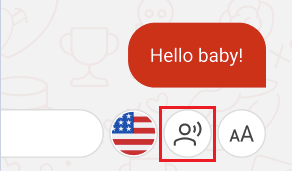
and our platform will seamlessly turn your spoken words into chat messages in real-time.
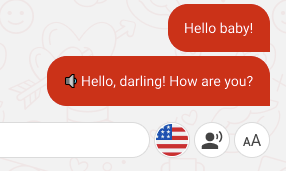
Selecting your spoken language is important for the function to work properly!
These messages will be sent to every Member in your Private automatically and continuously as you speak and are differentiated from typed messages with 🔉 emoji at the beginning.
This will make it easier for your Members to understand you and you don’t need to type even if they can’t hear you. You can switch it off anytime you want.
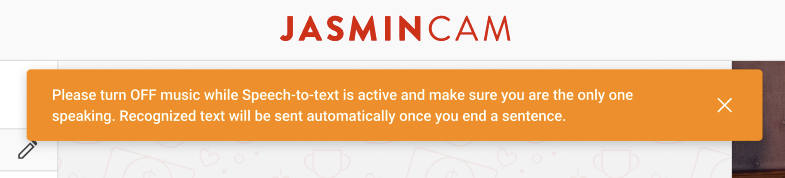
Reduce background noise when Speech-to-text is active
While the feature is active your microphone can pick up background noise, music, or other people talking in the background.
Make sure to minimize these to avoid unwanted messages sent in the chat.
Certified Partners are dedicated to providing the highest quality services. Jasmin Certified Partners’ commitment to excellence has earned them worldwide recognition. You can see the list of our partners here.
Introduction
LiveJasmin is constantly improving its services and we want to support our Models/Partners by providing you important information. We feel it’s important for our Models/Partners to be satisfied with the results of their efforts and performance.
We want to give you a few tips on how to become a successful Model/Partner on our site. Years of experience has helped us collect these tips. The advice will be especially useful for newly registered Models and Partners, but we feel even veterans could do with a few helpful pointers.
Whether a new or an experienced Model, the question is always the same:
How can I improve my traffic?
Everyone already has the tools to do so! We learned the most successful methods to increase your fame and popularity while analyzing our best Models, and we would like to share these techniques with you.
Uploading a Profile picture and other pictures to your My Content is not just a plus, but A MUST, if you want to do better!
An accepted Profile Picture means that your Model account is visible on our sites.
Your pictures must meet the quality standards and technical requirements according to the related category. For more detailed examples, you can check our Wiki guides here:
Never forget, after checking the professional pictures on the site, Members will have high expectations about the Models online. Make sure to keep your appearance as close as possible to your pictures.Â
Frequently asked questions
Can you provide me a guide about limited studio access?
Yes, here it is: https://www.youtube.com/watch?v=WUVKmFDUS1I&list=PL189OCUqNbDIBQqP842yr_v9AYy2KCIEz&index=1
Can you provide me a guide about how to set up the limited studio access?
Yes, here it is: https://www.youtube.com/watch?v=v3LLIfaHS1s&list=PL189OCUqNbDIBQqP842yr_v9AYy2KCIEz&index=2
Purpose
In order to make managing your Studios more comfortable, we have created the option to create Limited Accounts for one of your employees. Using the Limited Account, your colleague will be able to handle the most important functions of your Studio in your absence. Of course since we respect your privacy, not all information and features are available through a limited account.
I lost access to the registered e-mail address of my account. How can I change it to a new one?
If you are logged in to your acount, you can change your e-mail address in your Model Center top left corner by clicking on the settings (gear) icon. if you cannot access your account, then you need to contact our Support Team via e-mail (help@livejasmin.com).
How can I access my Model account if I am the Studio owner too?
If you are the studio owner too, it is possible that you registered yourself as a model with the same credentials. In that case you may access your Model account from the Models menu by clicking on your display name. However if you used another email address upon registering yourself as a Model, make sure that you add the correct one to log in to your Model Center and JasminCam.
Â
I created a Studio account instead of a Single account. Is there a possibility to change my Studio account to a Model account?
You can either register a new single account or to register a Model account under your Studio account, which you can use and stream on our site.
Who can reactivate an inactive Model account?
The Studio owner can change the status to inactive or reactivate inactive Model accounts that are registered in the Studio. If the account is under suspended or rejected status, then you need to contact our Support team.
What is the promotion period reset for?
Only Studio owners has this option within the Studio Center to reset the promotion period for their models, but only once.
Members or Models can see my Studio name?
Only the Studio owner or who you give limited studio access has possibilty to see your Studio name, which is displayed in the top right corner of the Studio Center. Models and Members are not able to see it.
There is no possibilty to change name of the Studio name or the registered owner.
We are not able to change the name of the Studio. Also the owner of the Studio account needs to remain the same person.
Welcome to your Studio Center
Congratulations! You can now start exploring LiveJasmin! However, before doing so, we kindly suggest that you read this short “Where to find what” guide to make it as easy as possible to naviagate around the Studio Center.
Models
As the owner of a Studio account, first you will see the number of your performers, and their current statistics detailed when selecting one.
You may sort your models according to the following filters:
All Models
Online
Unfinished
Rejected
Active
Closed
Suspended
orÂ
order by Status
order by Name
order by Category
You can register a new performer under your Studio Account by clicking on the Add New Model button on the right side.
Clicking on the information icon will display your model’s current Audio and Appearance ratings, if she/he is protected or not, has received the LiveJasmin Selection Badge or not, and if your Model has committed any violations.
By clicking on the “Income overview” icon, you will see your performer’s level in the payout system, the time the Model spent online and their income from the last period. Under “show more stats” you can see more detailed information regarding your Models’ income.
Under Account Settings you have the option to make your model’s account active or inactive, enable or disable the option for them to go online from mobile or start a video call, and change their password, if necessary.
If you click on the “View model on LiveJasmin” icon, you will see the layout of the performer’s account on the site in a pop-up window. Meanwhile, by clicking on the performer’s account name you will be logged in to the account itself.
Statistics
In this menu you can check statistics of all of your Models for set period of time and compare statistics for different periods.Â
Messages
In this menu, you can access all of your messages received and sent.
Personal Data
Under Personal Data, in case you are also a Model, you have the option to change details regarding your appearance and add or remove languages that you speak properly.
Personal Data: Age, Height, Hair color, Hair length, Eye color, Build, Breast Size, Sexual preference, Butt size, Dress size
Common languages: English, Dutch, French, Spanish, German, Italian
Payout
Income statistics – Here you can access all the detailed information regarding your total income. Also, you may set the period you would like to check at the top filters. Check your payslips under Payout Overview.
Payout options – This is where you can set the payment method, through which we will send you payouts as an Individual or a Company.
Payinfo FAQ –Â Here you will find all the necessary information regarding payouts and a short description of the offered payment methods.
Loyalfans
Under this section, you can create your Loyalfans Studio account. Once your Loyalfans registration is completed, your Models will be able to create Loyalfans profiles under your Studio account.Â
Referrals
Under this section, you can refer people to becoming LiveJasmin Members or Models.
Member Referral – you will receive a lifetime commission based on the Member’s overall spending!
Model Referral – you will receive 10% commission for one year from referred Models
Help and Info
News – As we would like to keep you as updated as possible, you will see all the information regarding changes and upcoming events under this menu. We recommend you check this daily.
Support Center – You can find answers to your questions here – and contact our colleagues, if needed.
Income Shares – Your actual earnings are based on the Level-dependent Payment System, giving you the option to increase your earnings without raising your rate per-minute. Your commission for Level-dependent Income will vary depending on your current Level. The higher your level, the higher the commission you receive.
After these menus, you can find our main Wiki page with all the necessary information you might need, LiveJasmin Rules, and the agreement you accepted earlier, in case you need any information from them.
We process user’s data to deliver content or advertisements and measure the delivery of such content or advertisements, extract insights and generate reports to understand service usage; and/or accessing or storing information on devices for that purpose. Below you may read further about the purposes for which we process data, exercise your preferences for processing, and/or see our partners. Cookie Policy.
These are cookies that are required for the operation of our website. We use, for example, these cookies to enable the purchase functionality on our website or to route traffic to the right servers on our network.
These cookies allow the website to remember choices you make or your preferences (such as your language or the region you are in) and provide enhanced, more personal features.
We use these cookies to gain insight into how you use our site. This helps us to understand how interact with our site, what is interesting for you and how we can improve our services, and enhance the overall user experience.
We use cookies to personalize the content specifically for you, by displaying models who may be of interest to you, based on your previous activity. Data relating to your previous activity might reflect your sexual preferences.
LiveJasmin Model & Studio Wiki contains adult content. By using the website you acknowledge that you are over 18.