Search
Search

Limited studio access

Frequently asked questions

Can you provide me a guide about limited studio access?

Yes, here it is:
https://www.youtube.com/watch?v=WUVKmFDUS1I&list=PL189OCUqNbDIBQqP842yr_v9AYy2KCIEz&index=1

Can you provide me a guide about how to set up the limited studio access?

Yes, here it is:
https://www.youtube.com/watch?v=v3LLIfaHS1s&list=PL189OCUqNbDIBQqP842yr_v9AYy2KCIEz&index=2

Purpose

In order to make managing your Studios more comfortable, we have created the option to create Limited Accounts for one of your employees. Using the Limited Account, your colleague will be able to handle the most important functions of your Studio in your absence. Of course since we respect your privacy, not all information and features are available through a limited account.

Video Guide

Setting up a Limited Account

To create a Limited Account, all you need to do is to open your Account Settings, and turn the “Limited Studio Access” option on. Now you have to give the Limited Account a password that differs from the password you are using for the Master Account.
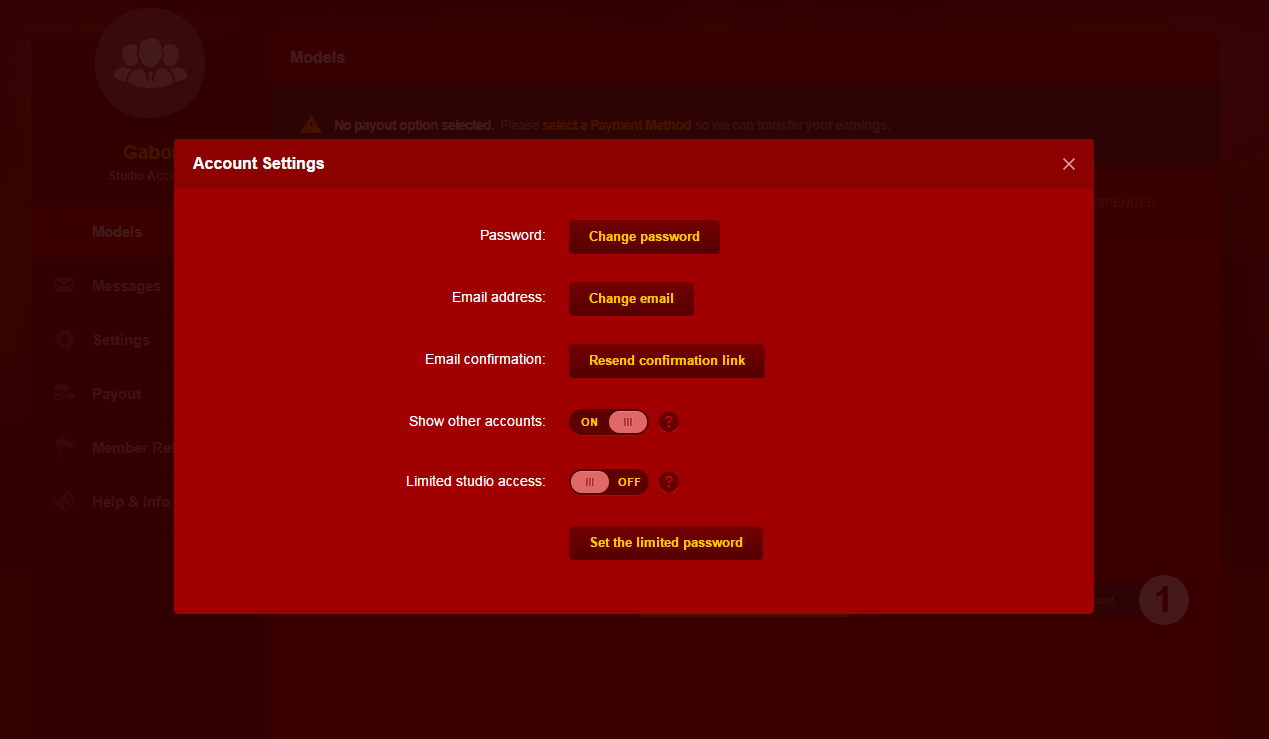
When your colleague wishes to log in to his/her Limited Account, he/she has to use the same e-mail address, but the newly created password. Of course later on, you will be able to change password for the account, or disable the feature by changing the option to off state.

Restrictions of a Limited Account

Since the Limited Account is created to help you in your work, it has several restrictions regarding its access to features.

These restrictions are the following:

  • Statistics
  • View Models
  • Statistics in View Models mode
  • Messages
  • Settings
  • Payout
  • Member referral
  • News
  • Support Center
  • Level Dependent Payment
  • Payinfo FAQ
  • Wiki
  • Rules
  • Agreement
  • Account settings

Table of Contents

Related topics

Speech-to-Text

Easier communication

We’ve added a handy new tool to our platform designed to make your Private Shows even more enjoyable.

Experience the convenience and intimacy of our Speech-to-Text feature in your next Private Show – it’s just one more way to make your streaming experience better than ever before

How does it work?…

Windows Guide

Frequently asked questions

Can you share a video guide regarding what are drivers?

Yes, here it is:
https://www.youtube.com/watch?v=Cdb-pD2j_os&list=PL189OCUqNbDK57ICorOstMgYJofzOHQG5&index=1

Can you share a video guide regarding what are Nvidia drivers?

Yes, here it is:
https://www.youtube.com/watch?v=22gYmvLk84Q&list=PL189OCUqNbDK57ICorOstMgYJofzOHQG5&index=2

Can you share a video guide regarding what are Intel drivers?

Yes, here it is:
https://www.youtube.com/watch?v=bePvE2NrExI&list=PL189OCUqNbDK57ICorOstMgYJofzOHQG5&index=3


🎉 Get started with JasminCam on…

JasminCam 5

Frequently asked questions

When does the Daily Goal ends?

You can check your Daily Goal counter inside your JasminCam under Statistics panel. The timeframe is displayed in Central European Timezone.

Where can I find the button to go online?

The yellow colored go live button can be found on the bottom of the application page in the middle both in mobile app and JasminCam. 

Can you send me the link to download JasminCam?

You may download JasminCam from your Model Center Home page. Scroll down to find **STREAM WITH JASMINCAM** widget and click on the yellow Download JasminCam button.

Can you share a video guide regarding camera selection?

Yes, here it is:
https://www.youtube.com/watch?v=_E4RTA8iF4o&list=PL189OCUqNbDKk2vqj6_I12C73sfaAv_X0&index=1

Can you share a video guide regarding microphone selection?

Yes, here it is:
https://www.youtube.com/watch?v=BRTlw3VJR3E&list=PL189OCUqNbDKk2vqj6_I12C73sfaAv_X0&index=2

Can you share a video guide regarding video quality?

Yes, here it is:
https://www.youtube.com/watch?v=DO8t7YGbS9E&list=PL189OCUqNbDKk2vqj6_I12C73sfaAv_X0&index=3

How can I block/mute unregistered guests in my room?

It is possible to mute unregistered guests in JasminCam, click on your profile picture at the top left corner, settings menu. Then ‘Chat customization’ menu. However if you would like to restrict visitors from specific countries, you may use the Country ban option.

Can I block my private show from Members?

Yes, you can block incoming private shows from Members, in case you don’t want them to take you for privates. You can set the option in your Jasmincam top left corner, under your name, you need to click on the “available” text, there you can block private show.

How to go offline from Jasmincam5?

You need to click on your profile image via your Jasmincam5 at the top right corner. There you will see the option “Go offline”. 

Message translate option works in Jasmincam5?

Yes received messages from Members are translated to Models in all chat areas. Model messages are translated to Members via Private chat area only.

Are saved Members notes from JasminCam visible for Members?

No. Members notes saved in JasminCam are only visible to the Models who created them.

🚀 JasminCam: Your secret weapon to…
Can’t find what you’re looking for? Contact LiveJasmin Support or talk to our AI Assistant

YOU MUST BE OVER 18 TO ENTER THE SITE

Logo

Privacy Preference Center

We process user’s data to deliver content or advertisements and measure the delivery of such content or advertisements, extract insights and generate reports to understand service usage; and/or accessing or storing information on devices for that purpose. Below you may read further about the purposes for which we process data, exercise your preferences for processing, and/or see our partners. Cookie Policy.

Manage Cookie Preferences

These are cookies that are required for the operation of our website. We use, for example, these cookies to enable the purchase functionality on our website or to route traffic to the right servers on our network.

These cookies allow the website to remember choices you make or your preferences (such as your language or the region you are in) and provide enhanced, more personal features.

We use these cookies to gain insight into how you use our site. This helps us to understand how interact with our site, what is interesting for you and how we can improve our services, and enhance the overall user experience.

We use cookies to personalize the content specifically for you, by displaying models who may be of interest to you, based on your previous activity. Data relating to your previous activity might reflect your sexual preferences.

LiveJasmin Model & Studio Wiki contains adult content.
By using the website you acknowledge that you are over 18.